Attention Employers: We are aware of an incorrect error message about contributions not being accepted. The message is an issue with SuperStream and is being investigated. Please contact your Relationship Manager for further information. 

With Payday Super changes coming into effect from 1 July, the way employees’ super contributions are paid by their employer is more important than ever. Employers will be required to ensure super contributions are received and ready for allocation within seven business days of their respective payday — leaving less time for any processing delays.

Switching from direct debit to direct credit can help employers streamline their payment process, reduce turnaround times and support them in meeting the new compliance requirements with greater confidence.

Equip Super will guide employers through the simple steps to make the switch, so they can stay on track and keep their employees’ super payments running smoothly.


Direct debit average timing

If you submit your contribution before 4:00pm AET on a business day, the clearing house will debit the nominated account that day. A standard clearance period of three banking days is in place to protect against any dishonours before sending contributions to the super funds.


Direct credit average timing

For direct credit for payments, the three days of “clearance” is eliminated, meaning payments should be received by clearing houses on day one and sent to funds on day one or two.

If you submit contribution data through the Portal, and then make the correct payment to the clearing house account with the correct PRN before 4:00pm AET on a business day, the clearing house will make payment to the super fund the following day. Allocation of a member's contributions is then managed by the super fund.

The above timing assumes the submission was made before 4:00pm AET, there were no matching issues and all days are business days. If either data or payment is delayed, this will cause a corresponding delay with data matching and payment to super funds.

How to switch

Employers can switch payment methods from direct debit to direct credit in the Employer Portal by clicking into Employer Maintenance, then Payment Details.  

NOTE: Employers may need to input their ABN in order for their employer details to pop-up. 

Then navigate to the Payment Details tab

Select Direct Credit from the drop down menu, update the settlement account details. Then save.

Direct credit process

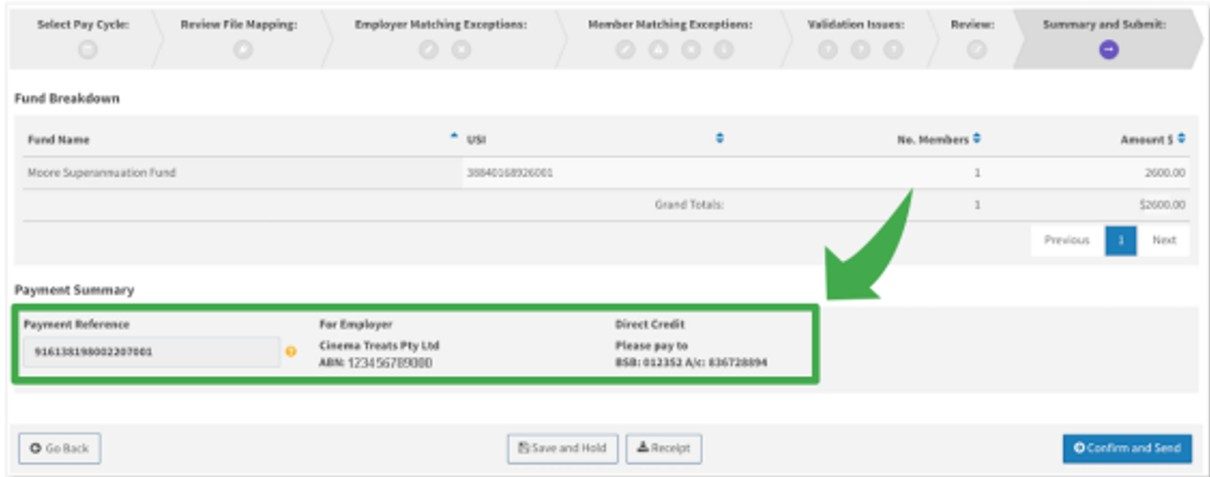
Direct credit requires you to complete an extra step after uploading and submitting your file - namely, you must make a payment (via your own internet banking) to the clearing house bank account using a Payment Reference Number (PRN) and an amount that matches the total for the submitted data. When your contribution file is successfully submitted, the Portal displays the PRN and the bank details as shown below.

It's important to remember the following:

  • You must make the EFT or BPAY payment as soon as possible after submitting the contribution batch.
  • Make sure to enter the correct amount to the payee (PayClear) and with the correct PRN.
  • For each submission, the portal automatically generates a PRN, in the format ABNddmm999 where:
    • ABN is the 11-digit Employer ABN stored in the system
    • ddmm is the day and month of the submission, and
    • 999 is a sequence number for the day (first submission will be 001)
  • You can change the PRN to a value of your own (up to 18 characters) when you submit a contribution. However, you must enter the same PRN when making the EFT payment.
  • You must ensure the amount matches the total submitted via the Portal.
  • You can save PayClear as a regular payee, as the BSB and account number will not change between submissions.
  • When using internet banking to make the payment, it's important to note:
    • Internet banking sites typically do not use the term 'PRN' or 'Payment Reference Number'. Look for terms like 'Description' or 'Reference', sometimes indicated as required for the payee's statement. Another clue is that there will be only one field long enough to take the full 18 characters.
    • If PayClear is saved as a regular payee, the reference number might be auto-filled from a previous payment, so make sure to update it to the PRN for your current payment.

Join our award-winning Fund

Get super equipped, with an award-winning, profit-to-member industry fund that works hard for you and your future. 

Join us


‡The rating is issued by SuperRatings Pty Ltd ABN 95 100 192 283 (SuperRatings) a Corporate Authorised Representative (CAR No.1309956) of Lonsec Research Pty Ltd ABN 11 151 658 561, AFSL No. 421445. Ratings are general advice only and have been prepared without taking account of your objectives, financial situation or needs. Consider your personal circumstances, read the product disclosure statement and seek independent financial advice before investing. The rating is not a recommendation to purchase, sell or hold any product. Past performance information is not indicative of future performance. Ratings are subject to change without notice and SuperRatings assumes no obligation to update. SuperRatings use proprietary criteria to determine awards and ratings and may receive a fee for the use of its ratings and awards. Visit superratings.com.au for ratings information. © 2024 SuperRatings. All rights reserved.